Find every subscription you're paying for.
Upload a bank or UPI statement, or connect Gmail, and SubRadar lists the subscriptions you pay for in seconds. Then it tracks what you spend each month, what renews next, and reminds you before every charge.
Free for up to 7 subscriptions. No bank login. Statements are read and thrown away.
Finds them for you
From a statement, Gmail receipts or your Chrome history, in seconds.
Renewal reminders
A Chrome notification before each charge, on the day you choose.
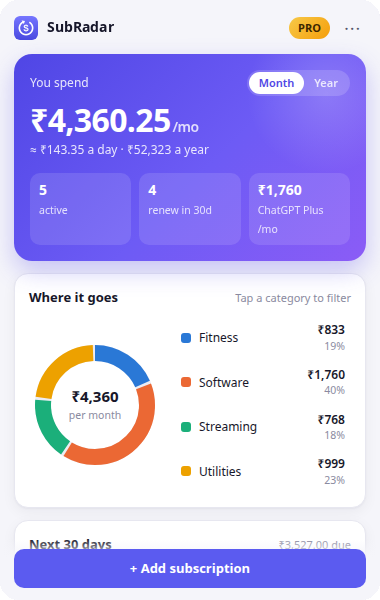
Spending insights
Monthly and yearly totals, by category, in any currency.
No bank access
You decide what's tracked. No card or bank details stored.
The forgotten ₹199 a month, found in seconds.
SubRadar's server spots recurring charges and receipts from about 40 services, including Netflix, Spotify, JioHotstar, ChatGPT and Google Play, plus any other charge that repeats. You review the list and add the ones you pay for.
Bank or UPI statement
Upload a PDF or CSV from your bank, card, Paytm, PhonePe or Google Pay. It's read in memory and thrown away.
Gmail receipts
Read-only access to receipts and renewal emails from subscription services. Disconnect any time.
Forwarded receipts
Not on Gmail? Forward a receipt to your private SubRadar address.
Chrome history
The extension checks which subscription sites you use, on your computer, in about a second.
Three steps, then it stays out of the way.
-
01
Install
Create a free account on the web or in the Chrome extension. Add the subscriptions you already pay for in a minute.
-
02
Detect
Upload a statement or connect Gmail and SubRadar finds the subscriptions you already pay for. After that, the extension offers to track each new one at checkout, pre-filled from the page.
Nothing is saved until you confirm.
-
03
Control
See renewals, totals and categories on the web or in the extension, and get a reminder before every charge.
Every subscription, with the details that matter.
Price, billing cycle, next charge and category, side by side. Select a row to see more.
| Service | Price | Next charge |
|---|
Sample data.
Small charges, added up honestly.
Weekly, monthly and yearly plans are converted into one monthly figure, so you can compare like with like.
All active subscriptions, per month.
If nothing changes.
Hear about a renewal before you pay for it.
The extension shows a Chrome notification ahead of each charge. Choose how many days before, or switch reminders off.

Chrome notifications from the extension
Try it. It's the same setting as in the app and the extension.
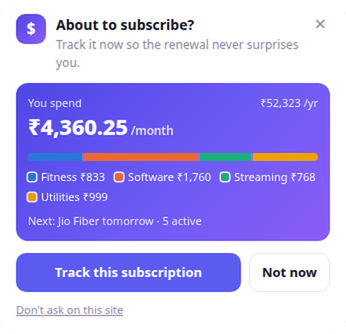
It speaks up at checkout. Otherwise it's quiet.
What it finds
When you ask it to, the subscriptions you already pay for: it checks your Chrome history for about 40 known services, on your computer, in about a second. After that, it notices checkout and payment pages (including Razorpay, Stripe, PayPal, Paytm and PhonePe), payment-confirmation pages, and buttons like "Pay now" or "Start membership".
When it runs
On pages you open. It checks the page address and looks for payment forms, and only shows its card on pages that look like a purchase.
What it reads
History only during a scan you start, with Chrome's permission, which it gives back right after. Page text only when you open the add form, to pre-fill it. Both stay on your device; nothing is saved until you choose.
How you control it
Dismiss the card, choose "Don't ask on this site", turn reminders off, or remove the extension at any time.
What happens to your data, plainly.
No marketing claims, just how it's built. The full details are in the privacy policy.
- No bank or card access
- We never connect to your bank. Pro payments go through Razorpay; we never see or store card numbers or UPI IDs.
- Only you can read your data
- Database rules restrict every account to its own subscriptions. Requests that aren't signed in are refused.
- Statements are read, then thrown away
- An uploaded statement is read in memory on our server to find recurring charges and then discarded. Only the subscriptions found are saved, for you to review.
- Your browsing stays on your device
- Checkout pages are read locally to pre-fill a form, and the history scan runs locally too. Page addresses, page content and your history are never uploaded.
- Passwords handled by our auth provider
- Sign-in runs on Supabase Auth, which stores passwords hashed. All traffic uses HTTPS.
- No ads, no data sales
- The product is paid for by Pro, not by your data. There are no ad or tracking scripts in the extension.
- Leave whenever you like
- Delete any subscription instantly, or ask us to delete your account and everything in it.
Free for seven. ₹99 a year for unlimited.
Pro is a single yearly payment. It never renews on its own.
Free
For your main subscriptions
- Up to 7 subscriptions
- Web app and Chrome extension
- Renewal reminders
- Spending insights and calendar
Pro
One payment for 12 months · no auto-renewal
- Unlimited subscriptions
- Everything in Free
- Pay by UPI, card or netbanking
- Cards outside India are charged ₹99, converted by your bank
Questions people ask.
How does subscription tracking work?
You add the subscriptions you pay for, in the web app or the extension. The extension can also scan your Chrome history, on your device, for subscriptions you already pay for, and offers to add new ones when you're on a checkout page, pre-filled from the page. Nothing is added without you confirming it. We don't connect to your bank or read your email.
Do I need the Chrome extension?
No. The web app works on its own in any browser. The extension adds checkout detection and renewal reminders, which are Chrome notifications.
Which browsers does the extension work in?
Google Chrome on a computer, and other browsers that install from the Chrome Web Store, such as Edge and Brave. Your subscriptions are saved to your account, so signing in on another computer brings them with you.
Can I add subscriptions manually?
Yes. Enter the name, price, billing cycle and start date, and the next charge is worked out for you.
Will I be notified before renewals?
Yes, if you have the extension installed and are signed in. It shows a Chrome notification on the day you choose, from the same day to 14 days before. You can change this or switch it off under Notifications in the web app, or in the extension's menu.
Is it safe to upload my bank statement?
It's sent over HTTPS, read in memory to find recurring charges, and thrown away straight after. The file and its other transactions are never stored or logged; only the subscriptions found are saved to your account, waiting for you to add or dismiss them. Password-protected PDFs are fine: the password is used once to open the file and not kept.
What does Gmail access let SubRadar see?
SubRadar asks for read-only access and only searches for receipts and renewal emails from subscription services. It never sends, deletes or changes email. Your access is stored encrypted, and Disconnect removes it and revokes it at Google.
What information does the extension access?
The address of the page you're on, to recognise checkout pages, and the page's visible text when you open the add form, to pre-fill it. If you choose "Find my subscriptions", it reads your Chrome history for that one scan, with your permission, and then gives the permission back (unless you turn on unused-subscription alerts). All of this happens on your device. Only what you save is stored, along with your email and your settings.
Can I delete my data?
You can delete any subscription at any time. To delete your whole account, email us from the address you signed up with and we'll remove it within 30 days.
Does Pro renew automatically?
No. Pro is a one-time payment for 12 months. You can pay again at any time to add another year. See the refund policy.